The Workflow Runner is the part of the Workflow Explorer where a workflow blueprint is executed as a visual model.
You can think of it as a lightweight “flight simulator” for hybrid quantum–HPC orchestration: instead of producing exact predictions, it helps you reason about time, utilization, and cost under common bottlenecks (queueing, latency, synchronization, and blocking).
Status: This page is a functional prototype and will evolve as features are implemented and validated.
What the Runner is for
After you define a workflow in the Builder, the Runner lets you:
Visualize execution flow across HPC and QPU components (what runs, what waits, what blocks).
Identify bottlenecks (idle time, blocked ranks, queue buildup, barrier stalls).
Explore tradeoffs by changing a small set of parameters and observing how outcomes change.
Build intuition for your own project: not “the one correct answer,” but a clearer sense of which design decisions matter most.
Runner interface overview
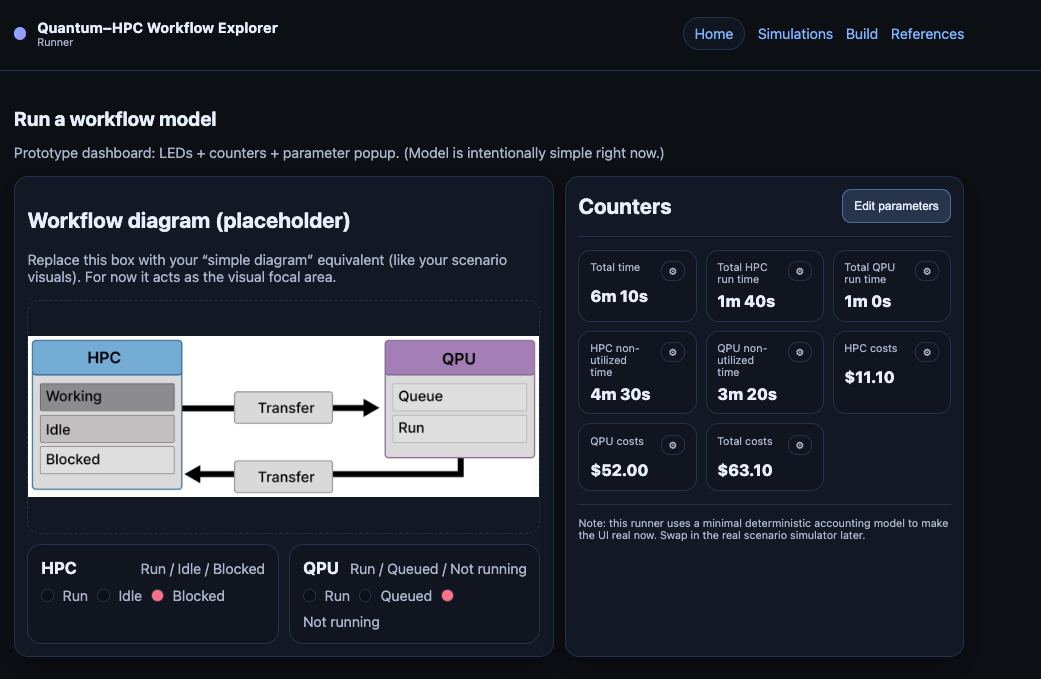
The Runner is organized into three main areas:
Workflow diagram
A visual representation of the workflow template and its control flow.
Emphasizes where quantum jobs are submitted and where synchronization / waiting can occur.
Live indicators and counters
Simple “dashboard” indicators (e.g., queue depth, working vs. idle vs. blocked ranks).
Designed to make bottlenecks obvious at a glance.
Controls and parameters
Start/stop controls and speed controls.
Parameter inputs that influence the run (timelines, rank counts, queue/latency assumptions, coarse cost settings).
How to use the Runner
1) Start from a template blueprint
Most runs begin by selecting a template in the Builder and filling in the required parameters (rank count, timing estimates, blocking behavior, cost assumptions). The Builder output provides the initial configuration for the Runner.
2) Run the model and observe the flow
Start the run and watch how work moves through the system:
when ranks compute
when they wait or block
when the queue grows or shrinks
when synchronization points stall progress
3) Adjust parameters and compare outcomes
Change one parameter at a time to build intuition. Useful “first experiments” include:
increasing the number of ranks (and watching queue pressure grow)
changing quantum job duration or queue time
changing synchronization frequency / barrier behavior
changing latency assumptions
Interpreting what you see
The Runner is intentionally coarse. It is designed to show patterns rather than predict exact timelines.
A few rules of thumb:
If the QPU queue grows, the workflow becomes QPU-limited (even if classical work scales).
If idle or blocked ranks dominate, orchestration choices and synchronization points are likely the limiting factor.
If the run is dominated by a short number of infrequent quantum calls, orchestration overhead may matter less than algorithmic structure.
Next steps
Use the Scenario Animations to learn and recognize common orchestration patterns.
Use the Builder to define a workflow blueprint that resembles your own application.
Use the Runner to compare architectural choices and develop intuition about time/cost/utilization tradeoffs.